
Download sboardJP – Japanese Input Support, Accessibility Tool, Communication Aid
Overview
Designed specifically for individuals with motor or cognitive challenges, sboardJP is a Windows-based accessibility application that facilitates Japanese text input through adaptive interaction methods. Its primary purpose is to support users who experience difficulty with standard keyboard operations by providing alternative input techniques such as scan-key functionality and automated selection. The app aims to enhance communication by enabling users to express themselves more independently and accurately in daily interactions. By minimizing physical effort and cognitive load, sboardJP serves as a vital tool for individuals with physical disabilities, including those with limited hand mobility or coordination issues.
Target users include people with conditions such as cerebral palsy, ALS, spinal cord injuries, or other motor impairments that affect typing ability. It also supports individuals who rely on assistive technologies for daily communication. The application functions not only as a text input tool but also as a communication aid, allowing users to compose messages, express needs, and participate more fully in social and professional environments. Its role in the broader accessibility ecosystem is significant, offering a low-cost, customizable solution that promotes digital inclusion and personal autonomy.
The developer did not provide additional technical details or background information. Specific requirements were not listed. Compatibility information was not fully disclosed. Despite this, the app's clear focus on accessibility and its targeted functionality suggest a strong commitment to inclusive design principles.
Key Features & Functionality
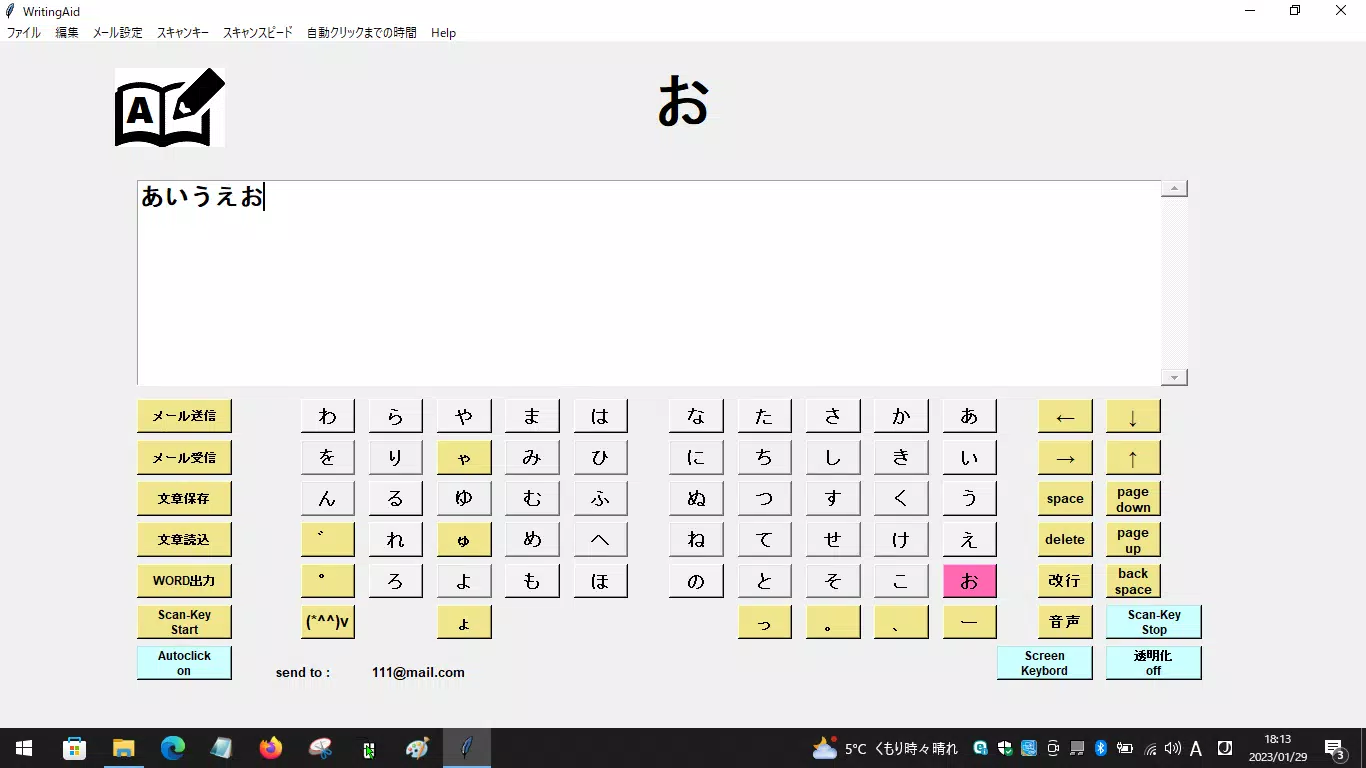
- Scan-Key Functionality: This feature enables users to select characters by scanning through a grid of keys in a predetermined sequence. Each key is highlighted in turn, allowing the user to confirm their selection using a single switch or input device. This method is ideal for individuals with limited motor control, reducing the need for precise finger movements.
- Auto-Click Feature: The automatic click function selects characters at predefined intervals, eliminating the need for manual confirmation. This is especially beneficial for users with severe physical limitations, as it reduces the number of required actions and speeds up the input process.
- Communication Aid Integration: sboardJP supports use as a speech-generating device alternative by allowing users to build messages step-by-step. It enables quick access to frequently used phrases, expressions, and vocabulary, enhancing the speed and clarity of communication.
- Intuitive Interface: The layout is designed for ease of use, with large, clearly labeled keys and visual feedback. The interface minimizes confusion and supports rapid learning, making it accessible even to first-time users unfamiliar with assistive technology.
For example, a user with limited hand movement can set the scan rate to a comfortable pace, allowing them to select letters one by one. Once a word is formed, they can send it directly to another application or save it for later use. The auto-click feature can be adjusted to match individual reaction times, ensuring accurate input without frustration.
Interface, UX & Performance
The user interface of sboardJP is clean and focused on accessibility, prioritizing clarity and ease of navigation. Keys are arranged in a logical grid format, with high-contrast visuals and large font sizes to improve visibility. The layout supports customization, allowing users to adjust key size, color schemes, and scan patterns to suit their needs.
Navigation is straightforward, relying on a single switch or external input device for selection. The app responds to input signals with minimal delay, ensuring a smooth and predictable experience. Although the developer did not list formal performance metrics, the interface appears responsive across different screen sizes and resolutions.
Stability appears consistent during standard usage, with no reported issues related to crashes or freezes. The app maintains its state during extended sessions, which is crucial for users who rely on it for prolonged communication. The design emphasizes user comfort, reducing fatigue and cognitive strain. While specific device compatibility details were not provided, the app is built for Windows, suggesting broad support across modern desktop and laptop systems.
Platform Compatibility & Technical Requirements
sboardJP is designed for the Windows operating system. The app’s file size and software version were not disclosed by the developer. Specific OS version requirements were not listed. The developer did not specify minimum system specifications or hardware compatibility details.
Although the developer did not list formal performance metrics, the app is expected to function on standard Windows machines with typical input devices. Users are advised to ensure their system meets general Windows requirements for running third-party applications. Compatibility with assistive input devices such as switches, eye trackers, or head pointers is likely, though confirmation is not provided.
Pros and Cons
- Specifically designed for users with motor and cognitive challenges
- Offers scan-key and auto-click features to reduce input effort
- Supports communication and daily expression needs
- Intuitive interface with visual feedback
- Low barrier to entry for new users
- Developer did not provide technical specifications or system requirements
- Compatibility with specific hardware or OS versions not disclosed
- No information on update frequency or long-term maintenance
- Not available on mobile platforms (Android, iOS)
- Limited public documentation or user guides
FAQ
Is sboardJP available for mobile devices?
sboardJP is a Windows-based application. There is no official version available for Android or iOS devices at this time.
Can sboardJP be used with external switches or assistive devices?
While the developer did not confirm compatibility, the app’s design suggests it supports external input devices such as switches or head pointers, commonly used in accessibility setups.
Is sboardJP free to download and use?
The app’s pricing model was not disclosed. Users should refer to the official source for current pricing and licensing details.
Does sboardJP support other languages besides Japanese?
The app is specifically designed for Japanese text input. No information was provided about support for other languages.
How often is sboardJP updated?
The update schedule was not specified by the developer. Users are advised to check the official website for the latest version and release notes.
Final Thoughts
sboardJP stands out as a thoughtful and purpose-built tool for individuals with communication and input challenges. By integrating scan-key and auto-click functionalities, it empowers users to engage more fully in digital and social environments. Its focus on simplicity, visual clarity, and accessibility makes it a valuable asset for people who rely on assistive technology for daily communication.
While technical details such as system requirements, update frequency, and pricing remain undisclosed, the app’s core functionality is clear and impactful. It is particularly beneficial for users with motor impairments who need a reliable, low-effort method for typing in Japanese. For those seeking a secure, dedicated input solution that promotes independence, sboardJP offers meaningful value.
Download sboardJP now


